















Classroom ideas
Fun, engaging, collaborative challenges with Classtime
January 7, 2019
clever


Classtime— new in Clever Library— is a digital teacher’s assistant with lessons and materials designed to motivate and engage students. As a web-based platform Classtime works on any device, and its real-time feedback lets teachers monitor participation and progress of each individual student.
Classtime has a large collection of fun collaborative challenges. Each challenge begins when the teacher projects a story narrative in the classroom. Examples of these challenge narratives include: building a jungle rollercoaster, resupplying a space station and solving a city’s pollution problem.

In this collaborative challenge, students work together to build the Tower Bridge in London
The story on the classroom projector moves along as students correctly answer questions on their own devices. Teachers can customize challenges so that students work individually, together in teams or collaborate as an entire class. This is perfect for teachers that use differentiated learning strategies.
Classtime also lets teachers design questions for their own lessons and curricula. The platform supports a wide range of question types, from multiple choice, checkboxes and true or false to category sorting and free text answers. Alternatively, teachers can use lessons and questions written by other teachers or select from over 30,000 curriculum-aligned questions drawn from reputable sources like Khan Academy.
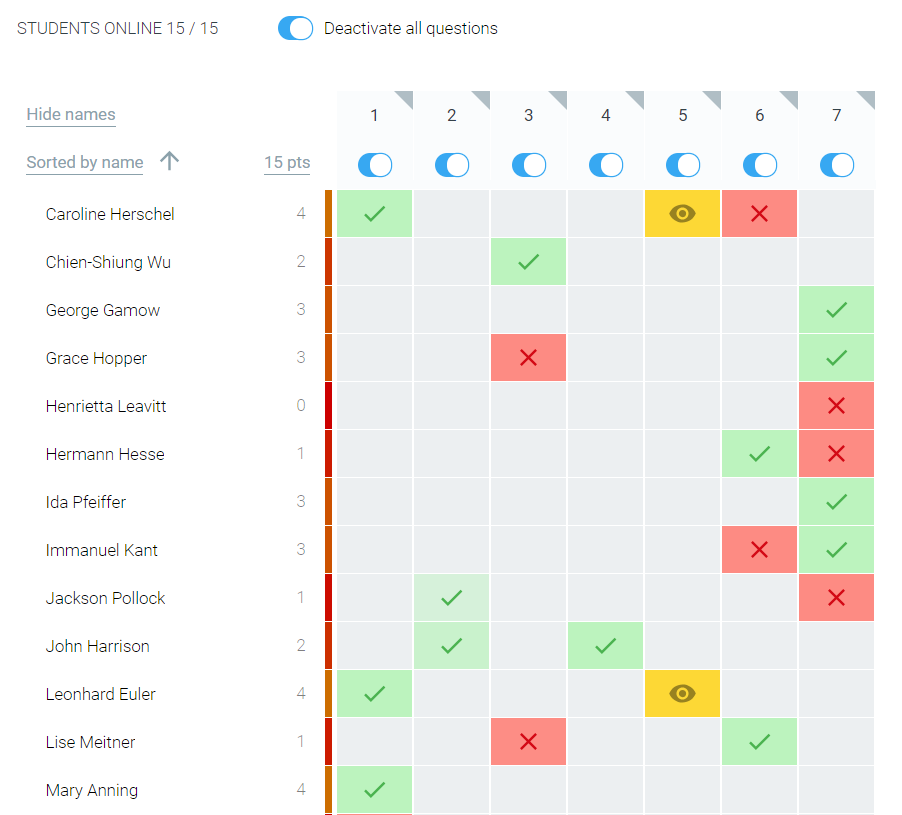
Teacher dashboard showing real-time results
Classtime’s teacher dashboard shows student results in real time, providing immediate feedback. It also includes a robust, backend analytics engine. This helps guide teachers with a range of descriptive, predictive and prescriptive analytics data.
Available now in Clever Library— you can check out Classtime today!

More to read

Districts
Teachers
August 3, 2026
District-Wide Defense: A Texas School District’s Successful Rollout of Student MFAEdinburg CISD needed to secure student identities across a 30,000+ Chromebook fleet—without overwhelming an already stretched IT help desk. With Clever's age-tiered MFA framework, the Texas district enrolled 99% of its 32,000 students within two months, virtually eliminating password reset tickets and empowering teachers to resolve credential issues in the classroom.
Districts
Global
Teachers
August 3, 2026
One Sync, Half a Million Students: TDSB’s Rostering TransformationCanada's largest school board needed a smarter, more secure way to manage student data across a growing suite of learning applications—without adding to its IT team's workload. With Clever, Toronto District School Board built a customized, application-level rostering model that automated data sync from PowerSchool, gave teachers class-level access, and strengthened data security for 500,000+ students and staff.
Districts
Teachers
July 7, 2026
Newcastle Grammar School Meets Essential 8 Compliance with Clever MFANewcastle Grammar School closed a long-standing MFA gap for students without personal devices by deploying Clever's visual authentication integrated with Microsoft Entra ID, reducing SOC security alerts and unlocking modern authentication features like Windows Hello and Face ID. The school can now confidently answer board and cyber insurance questions on MFA coverage, with plans to extend the program to Years 8–9 and beyond.