















Clever resources
Are you ready for summer school?
June 18, 2018
clever


Doesn’t it feel like there’s never enough time between the end of the school year and the start of summer school? Fear not—you can get your district all set up for summer school on Clever by following three steps.
First, check your sync pause date
Your student information system (SIS) data changes from the current school year to the next, which impacts the data you have in Clever. To minimize impact of the large data changes, you’ll need to “pause” existing school year data for the summer. By default, your pause date has been set for two days before the last day of your school year. Check your pause date and adjust as necessary, or learn more about sync pauses.
Second, create custom sections
Since your SIS sync will be paused (and you may not already store summer school rosters in your SIS), you’ll want to create special “custom sections” for your summer school classes to share with the applications you’re using this summer. You (or your school tech leads) can create custom sections in either of two ways:
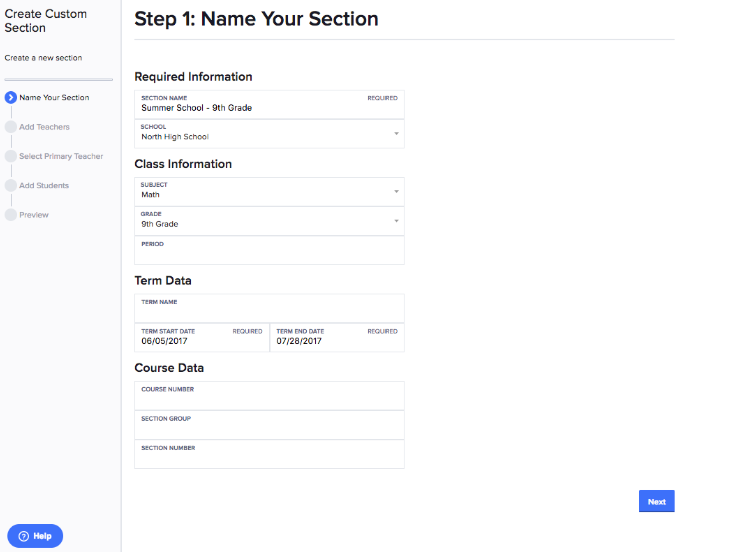
1. Manually create custom sections in your Clever dashboard.
2. Bulk upload your data files in your Clever dashboard bulk uploader. Note: Please contact Clever Support to get this enabled.
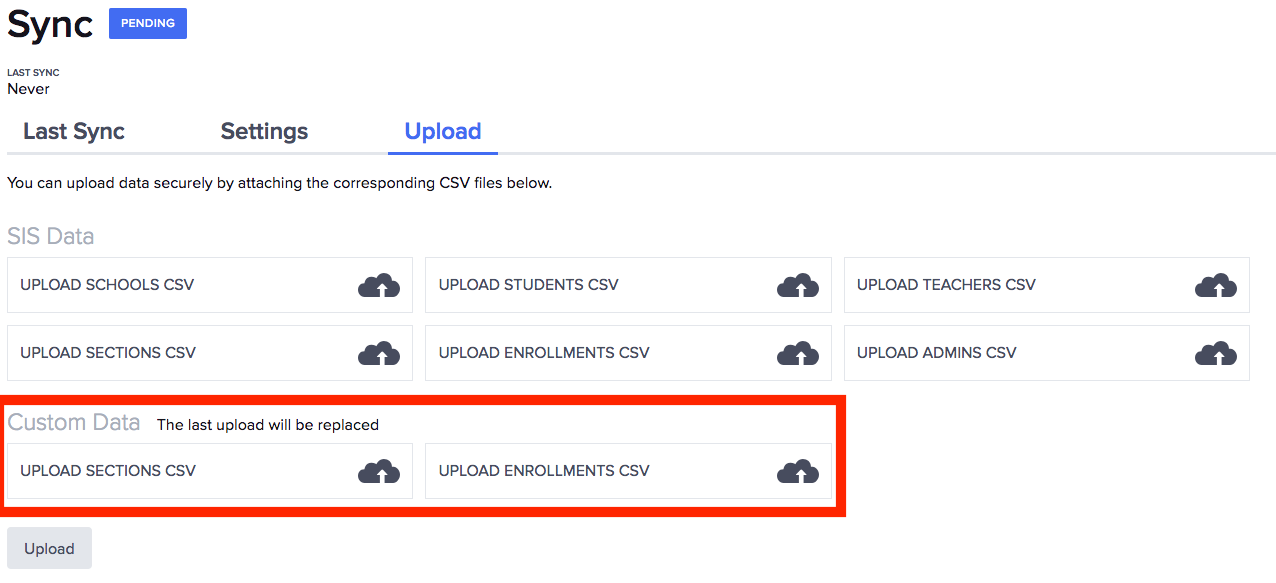
Find detailed instructions on creating and maintaining custom sections here.
Third, add your summer school applications
You’re almost done! Now add the applications that your students will be using this summer. (Don’t forget to share the custom sections you just created with those applications.)
Start adding all applications in your dashboard, or learn how to do this by clicking here.
And of course if you have any questions, our friendly support team can walk you through the set up steps. Learn more in our Help Center.

More to read
Districts
Teachers
August 3, 2026
District-Wide Defense: A Texas School District’s Successful Rollout of Student MFAEdinburg CISD needed to secure student identities across a 30,000+ Chromebook fleet—without overwhelming an already stretched IT help desk. With Clever's age-tiered MFA framework, the Texas district enrolled 99% of its 32,000 students within two months, virtually eliminating password reset tickets and empowering teachers to resolve credential issues in the classroom.

Districts
Global
Teachers
August 3, 2026
One Sync, Half a Million Students: TDSB’s Rostering TransformationCanada's largest school board needed a smarter, more secure way to manage student data across a growing suite of learning applications—without adding to its IT team's workload. With Clever, Toronto District School Board built a customized, application-level rostering model that automated data sync from PowerSchool, gave teachers class-level access, and strengthened data security for 500,000+ students and staff.

Districts
Teachers
July 7, 2026
Newcastle Grammar School Meets Essential 8 Compliance with Clever MFANewcastle Grammar School closed a long-standing MFA gap for students without personal devices by deploying Clever's visual authentication integrated with Microsoft Entra ID, reducing SOC security alerts and unlocking modern authentication features like Windows Hello and Face ID. The school can now confidently answer board and cyber insurance questions on MFA coverage, with plans to extend the program to Years 8–9 and beyond.