















Clever product updates
July 2017 product release notes
July 19, 2017
clever


Summer is coming to an end, and many districts are beginning to go back to school! We’ve been working hard to make sure that our districts and applications have the best experience possible when the new year kicks off. See what’s new below.
- App-side filtering
- Custom sections
- Data stewardship
- Terms of Service update
- Badge bulk generation for 4th-6th grade
- Badges invalidation
App-side filtering
Applications can now limit which data are shared with them to prevent oversharing and ensure only relevant data are shared. Read more here.
Custom sections
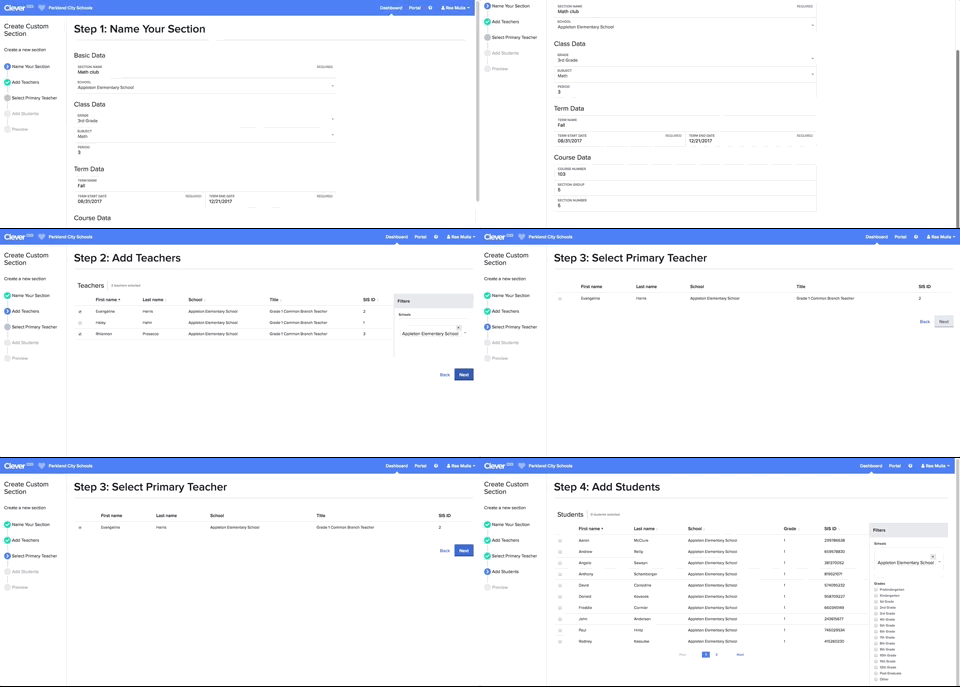
We’ve added the ability for district admins to create custom sections from within the Clever Dashboard. This allows them to share the exact data they’d like with applications, regardless of whether it exists as a section in the Student Information System. Navigate to “Custom Sections” under the “Support Tools” section of the navigation and click “Create section” to get started! Read more.
Data stewardship
Districts can now set sharing rules based on English language learner status (ELL), Limited English proficiency (IEP), and Free and reduced-price lunch (FRL) status on a per app basis, allowing districts to choose which applications receive the data. Districts can find this option in the Data Sharing tab for each application in their dashboard.
We just published a Privacy Policy and Terms of Service update on our website. You can learn more here.
Badge bulk generation for 4th-6th grade
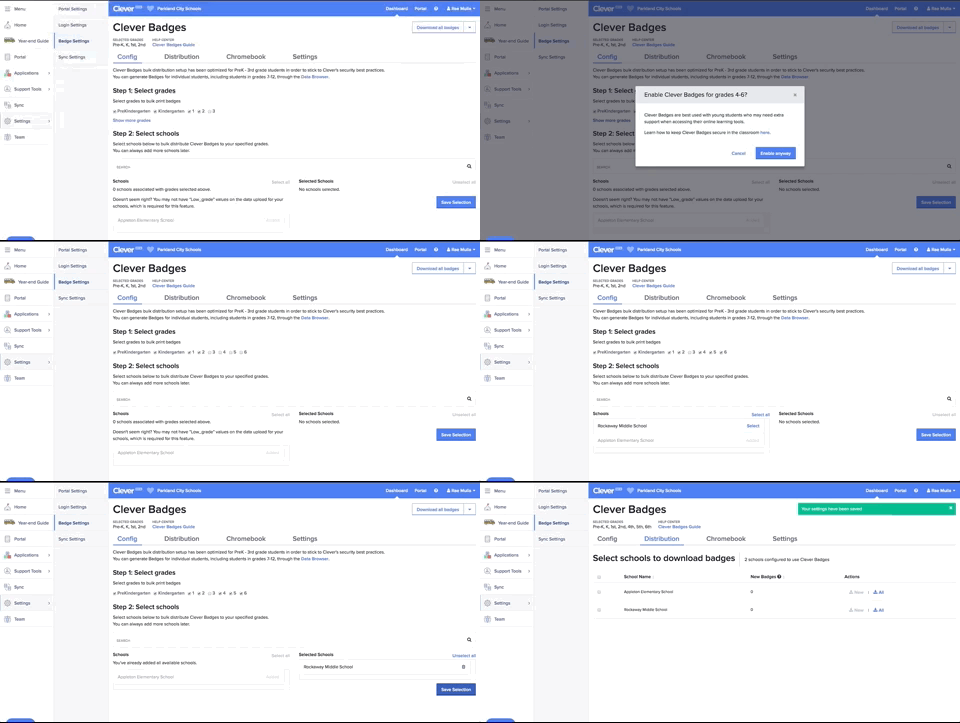
We’ve added the option to bulk-generate Badges for students in 4th-6th grade. Districts can do this from the Badge Settings page inside their dashboard.
Badges invalidation
If you are a district that used Badges in 2016-17, Clever automatically invalidates your 2016-17 Badges when you unpause your sync. This is done for security reasons, to make sure we don’t have stray Badges floating around. Districts should be on the lookout for more reminders around options for Badge invalidation, including the ability to opt out. Learn more.

More to read
Partners
October 8, 2026
Why 5 Star Students is betting on Clever’s AnySchool to close its integration gap5 Star Students expects Clever’s AnySchool to close its integration gap across 1,200 schools, so its small team can onboard any school without building new SIS integrations.
Partners
October 8, 2026
How 1-2-3 Wellness is using AnySchool to say “any school, any student” and mean it1-2-3 Wellness replaced two parallel systems with Clever’s AnySchool, freeing its six-person engineering team to build product and reach every student, Clever school or not.

Districts
Teachers
August 3, 2026
District-Wide Defense: A Texas School District’s Successful Rollout of Student MFAEdinburg CISD needed to secure student identities across a 30,000+ Chromebook fleet—without overwhelming an already stretched IT help desk. With Clever's age-tiered MFA framework, the Texas district enrolled 99% of its 32,000 students within two months, virtually eliminating password reset tickets and empowering teachers to resolve credential issues in the classroom.