















Learning applications
Reading
Classroom reading made social with Edji
April 11, 2019
clever


This article is part of a series that spotlights learning apps available in the Clever Library, a place where teachers can discover and adopt great apps for their classrooms through the Clever portal.
Edji is the way to make student reading engagement visible
With Edji, teachers have the ability to collaborate with students on any article, image, GIF or PDF using the custom Reading editor. Students annotate content with Text, Emoji, or recorded Audio, allowing them to take notes, make connections and share their ideas on the page. Edji offers teachers unique insight into their students’ thinking with the ability to see all of their comments live.

Teachers can also see where comments are being made using Heat Vision which makes text glow as multiple students comment on the same areas of the content. The real power comes when teachers turn Heat Vision on for their students, allowing them to see their peers comments, the areas that classmates thought were most important, and start discussing amongst themselves using the comment Replies feature.
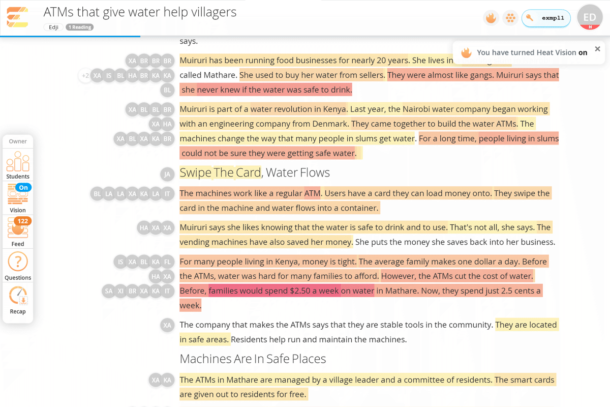
Edji is highly versatile because teachers hold the power to control exactly what their students need. In Language Arts classes, students can analyze poetry and study writing styles. In Science and History, students can breakdown articles, papers or historical accounts to further their understanding. Even in Math, students can dissect word problems or analyze equations for mistakes. For a quick win, grab a reading from the Discover feed of pre-made, teacher-created Readings to find a great starting point for the subject area and student reading level.
Edji is a free web application that is now available in the Clever Library and can be used on any computer, tablet, or Chromebook. Follow us on Twitter @edjinotes to learn more, get advice on increasing student engagement and more!

More to read

Districts
Teachers
August 3, 2026
District-Wide Defense: A Texas School District’s Successful Rollout of Student MFAEdinburg CISD needed to secure student identities across a 30,000+ Chromebook fleet—without overwhelming an already stretched IT help desk. With Clever's age-tiered MFA framework, the Texas district enrolled 99% of its 32,000 students within two months, virtually eliminating password reset tickets and empowering teachers to resolve credential issues in the classroom.

Districts
Global
Teachers
August 3, 2026
One Sync, Half a Million Students: TDSB’s Rostering TransformationCanada's largest school board needed a smarter, more secure way to manage student data across a growing suite of learning applications—without adding to its IT team's workload. With Clever, Toronto District School Board built a customized, application-level rostering model that automated data sync from PowerSchool, gave teachers class-level access, and strengthened data security for 500,000+ students and staff.

Districts
Teachers
July 7, 2026
Newcastle Grammar School Meets Essential 8 Compliance with Clever MFANewcastle Grammar School closed a long-standing MFA gap for students without personal devices by deploying Clever's visual authentication integrated with Microsoft Entra ID, reducing SOC security alerts and unlocking modern authentication features like Windows Hello and Face ID. The school can now confidently answer board and cyber insurance questions on MFA coverage, with plans to extend the program to Years 8–9 and beyond.