















Clever product updates
We’ve redesigned our login page for districts
November 16, 2016
clever


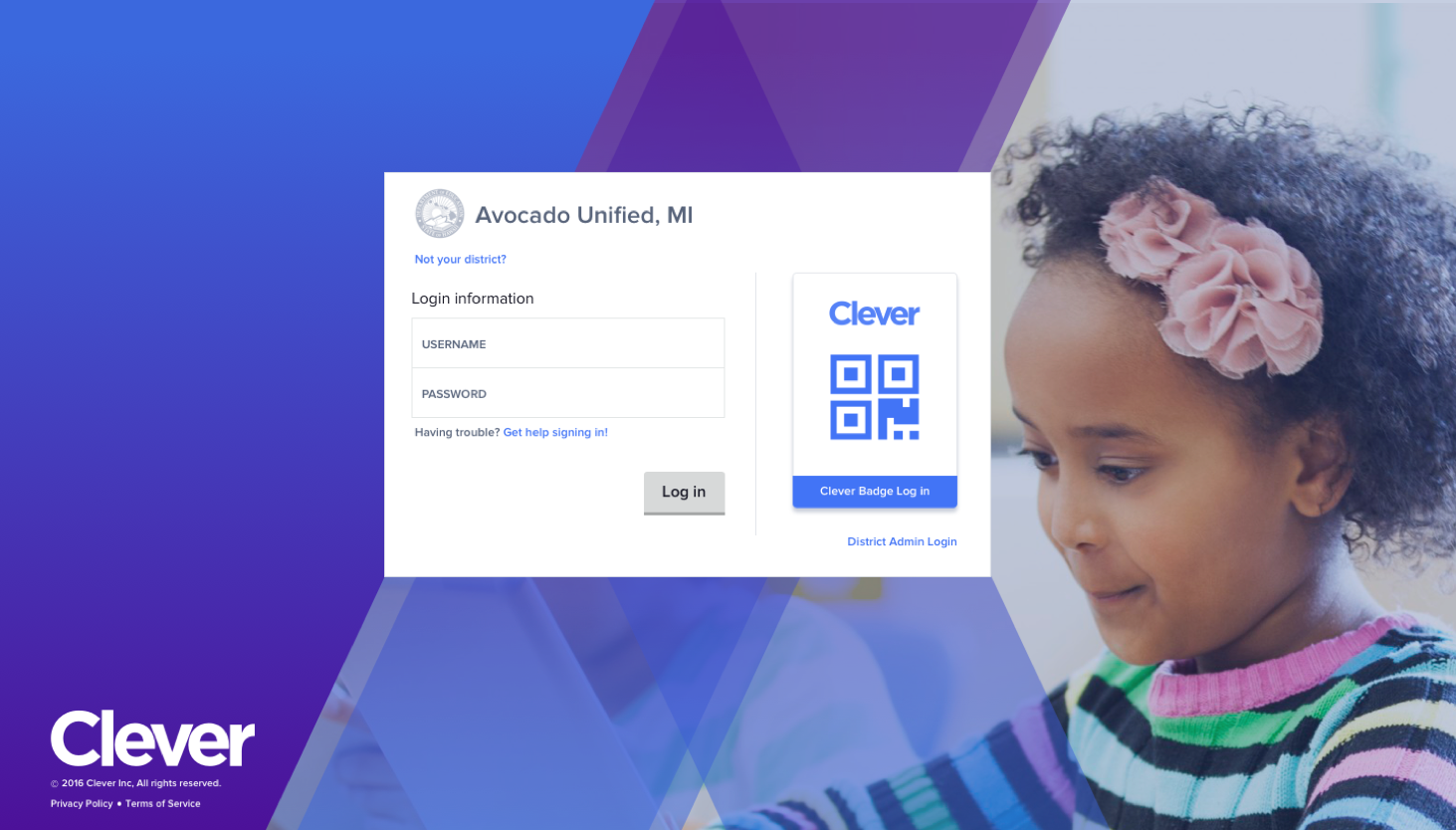
We’ve updated our Clever Portal login page to simplify the login process for students and teachers!
We’re constantly thinking through ways we can make it even easier for students to access their learning applications through Clever so teachers can spend more time instructing and less time troubleshooting username and password errors.
The redesigned login page will better surface login assistance and troubleshooting tools, render more appropriately on mobile devices, and allow for greater flexibility as we roll out new features. If a student clicks Get help signing in!, they’ll be provided more information on logging in with a teacher generated, one-time Backup Code and information for their district’s technical support contact.
The updated Clever Badge image is also intended to make it a bit easier for a younger student to figure out how to log in using their Clever Badge. If you’re a district that hasn’t rolled out Clever Badges for your K-2 students yet, learn more about how this new tool is saving teachers and students valuable time in the classroom.
The redesigned login page also allows districts to further customize their Clever Portal page for their district. Districts can email their District Success Manager or support@clever.com a 250×100 PNG file of your district logo, and we’d be happy to add it to their Clever Portal login page.
All districts will see these changes in December. Please feel free to share this screenshot below with your teachers if you’d like to prepare them beforehand.
As always, let us know if you have any questions or feedback!

More to read
Districts
Teachers
August 3, 2026
District-Wide Defense: A Texas School District’s Successful Rollout of Student MFAEdinburg CISD needed to secure student identities across a 30,000+ Chromebook fleet—without overwhelming an already stretched IT help desk. With Clever's age-tiered MFA framework, the Texas district enrolled 99% of its 32,000 students within two months, virtually eliminating password reset tickets and empowering teachers to resolve credential issues in the classroom.

Districts
Global
Teachers
August 3, 2026
One Sync, Half a Million Students: TDSB’s Rostering TransformationCanada's largest school board needed a smarter, more secure way to manage student data across a growing suite of learning applications—without adding to its IT team's workload. With Clever, Toronto District School Board built a customized, application-level rostering model that automated data sync from PowerSchool, gave teachers class-level access, and strengthened data security for 500,000+ students and staff.
Districts
Teachers
July 7, 2026
Newcastle Grammar School Meets Essential 8 Compliance with Clever MFANewcastle Grammar School closed a long-standing MFA gap for students without personal devices by deploying Clever's visual authentication integrated with Microsoft Entra ID, reducing SOC security alerts and unlocking modern authentication features like Windows Hello and Face ID. The school can now confidently answer board and cyber insurance questions on MFA coverage, with plans to extend the program to Years 8–9 and beyond.